Autoblogging: A Company Blog That Writes Itself

Every SEO guide says the same thing: run a company blog, publish regularly, answer your customers’ questions, and Google will start showing you over time. It’s true — and it’s one of the cheapest ways for a website to gradually pull in customers on its own, without paying for every click. There’s just one problem that sinks nine out of ten company blogs: consistency.
The first article gets written in a burst of enthusiasm. The second a week later. The third “when I find a moment”. The fourth never appears. The blog goes quiet, and the whole SEO effect goes with it, because Google rewards freshness and regularity, not a single sprint. Autoblogging solves exactly this problem: your site publishes on its own, on a rhythm you set once, and at most you approve the topics or edit the finished drafts.
This piece shows how to set it up from scratch.
What it actually is
Autoblogging in Sitario is a publishing schedule wired up to a content generator. You set how often a new article should appear and how long it should be — and at the scheduled times the system writes the piece itself, targeting your customers’ search phrases, generates a cover image for it, and publishes it on your site. No logging in, no reminding yourself “I need to put something on the blog”.
This isn’t a junk generator churning out filler for Google. Every article is a specific, sensible answer to a question in your field — the kind someone who knows their stuff would write, if they had the time every Monday.
Step 1. A site with an active blog
Autoblogging runs on a site that has the blog module switched on. If you already have a site with Sitario, you add the blog as a subscription — a monthly plan that gives you a character allowance for content and unlocks the schedule. If you don’t have a site yet, you start by placing an order, and you enable the blog right at checkout or later from the dashboard.
Why a subscription rather than a one-off fee? Because a blog is an ongoing service — the character allowance renews every month, and with it the schedule gets back into its rhythm. With a one-time package you’d write a few articles and stop; a subscription keeps the blog alive.
Step 2. You set the schedule — once
In the dashboard, under the blog tab, you’ll find the autoblog card. You set three things and that’s basically it:
- How often — weekly, every two weeks, or monthly.
- On which day — e.g. every Monday.
- How long the articles are — from short pieces to in-depth guides.
From that moment on, the site knows when to publish. You don’t have to come back to it — the schedule counts each new date from the planned start, so the rhythm never drifts, even if a date happens to land on a public holiday.
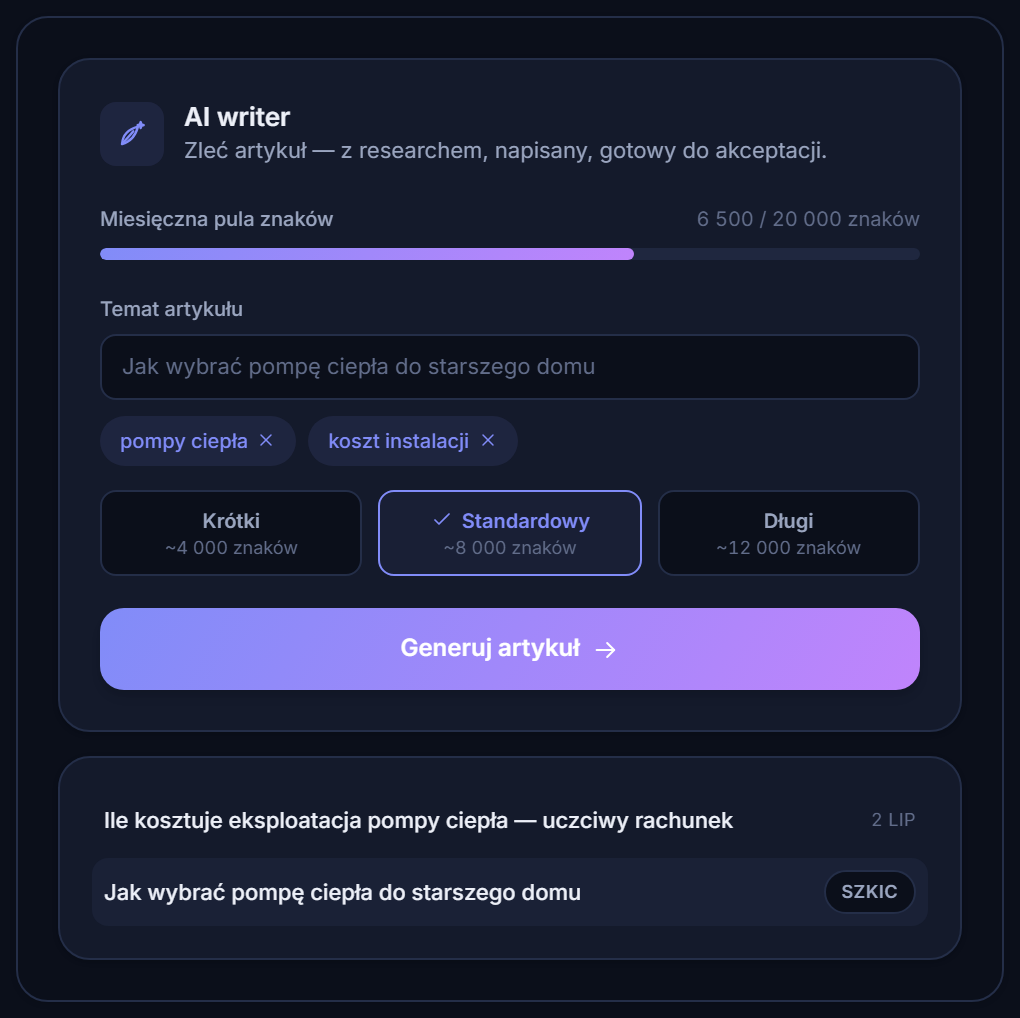 The same engine that writes on demand also works in the background on a schedule.
Step 3. Topics — you decide how much control you keep
A blog is only as good as its topics, so here you choose your level of involvement:
- You approve suggestions. Based on your field and your site’s content, the system proposes a list of topics with search phrases. You click “accept” on the ones that fit, reject the rest, add your own. The schedule only pulls from the queue what you’ve approved.
- Full autopilot. If you trust the suggestions, you switch on a mode where the system picks the next topics off the list itself — and the blog runs entirely without you.
By default you approve topics, not finished drafts — a deliberate middle ground. You keep control over what the site writes about, without having to read every article before it goes live. And when the topics in the queue run low, the system adds fresh suggestions on its own, so the schedule never stalls for want of a list.
Step 4. Auto-publish or drafts for editing
The second choice is about what happens to the finished text:
- Auto-publish on — the article lands on the site right away, with a cover image, without any input from you. The blog grows in the background.
- Auto-publish off — the finished text waits as a draft, and you get a nudge that it’s ready to edit. You tweak whatever you see fit and publish with a single click — or delete it if it doesn’t fit.
The first option is convenience, the second is control. You can start with drafts, get comfortable with the quality, and then switch to full automation.
Step 5. The character allowance and peace of mind about continuity
Every article draws from the monthly character allowance in your subscription. If you set an intensive rhythm — long pieces every week, say — the allowance may run out before the period ends. When that happens, you have two options:
- By default the schedule politely waits until the allowance renews and gets back into its rhythm on its own — you’re told about it, you do nothing.
- Or you switch on auto top-up: when the allowance runs dry mid-month, the system buys another package from your saved card and keeps publishing without a break. You set a top-up limit here too, so the spending stays under control.
This way the blog doesn’t grind to a halt at the worst possible moment — right when it’s picking up speed in Google.
What comes of it
The effect doesn’t show instantly, but sooner than most people expect. A well-built, fast site gets indexed in a flash — freshly published articles can hit Google’s results within hours, and the first impressions and clicks show up in the very first days. Every new post is a new phrase your site can be found for, and another signal to Google that the site is alive.
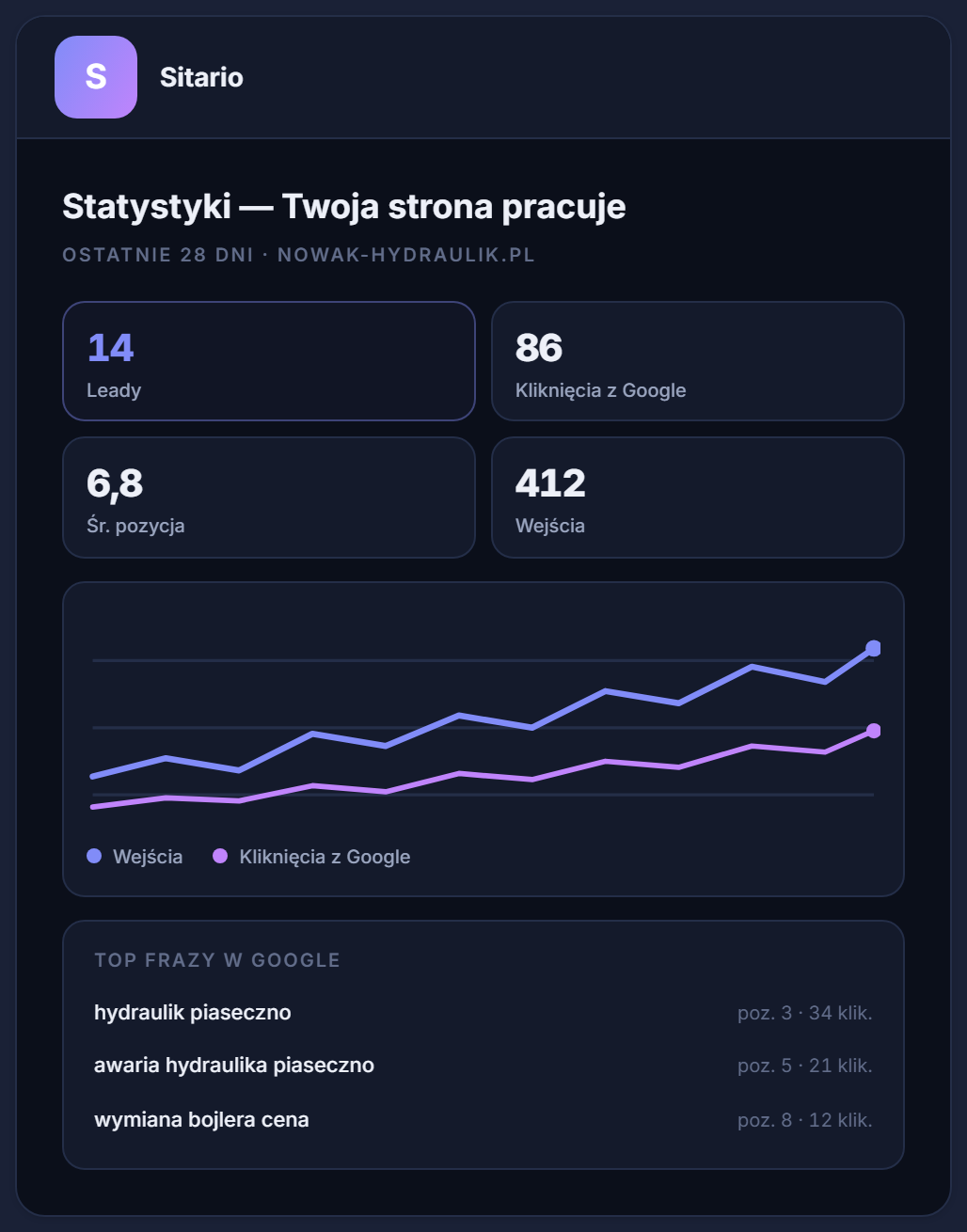 A growing blog shows up in the stats: new search phrases, impressions, rankings.
The dashboard shows it plainly — leads, search phrases and rankings from the last 28 days in one place, with no separate tools to configure. The blog stops being something you have to remember and becomes something that simply works in the background.
Start with a single setting
The whole of autoblogging comes down to one decision: how often the site should publish. The rest — topics, writing, cover images, publishing, continuity — the system takes on itself. If you already have a site with Sitario, switch on the blog and set the schedule today. If not — order a site, and the blog that writes itself gets added to it from day one.